Which kind of “auto” do you need?
| Task | What it does | Version / status |
|---|---|---|
| Automatic battles | Continues combat at a chosen route or hunt. | Built into the reviewed .net and .io gameplay; .com creator also describes auto-battle. |
| Automatic capture | Attempts a catch with your selected policy and available balls. | .net has All / New. .io has its own capture automation, with VIP Auto-Catch described in its terms. Availability is version-specific. |
| Hunt comparison | Shows estimated performance for locations. | .io’s Hunt Analyser is in-game; Liang’s /hunt is an independent extension. |
| Automatic switching / restocking | Moves to another hunt or buys supplies under configured limits. | Third-party tools such as Zennex’s Auto Hunt for .io. Separate from the game’s built-in loop. |
| Console or userscript automation | Executes code in the game page. | No unknown-source scripts or install commands are hosted here. A matching name does not prove compatibility. |
Not sure which address you play? Identify your PokeIdle version first. The PokeIdle 2 nickname usually needs the .net revamp context, not an .io extension.
pokeidle.net: set up built-in catching
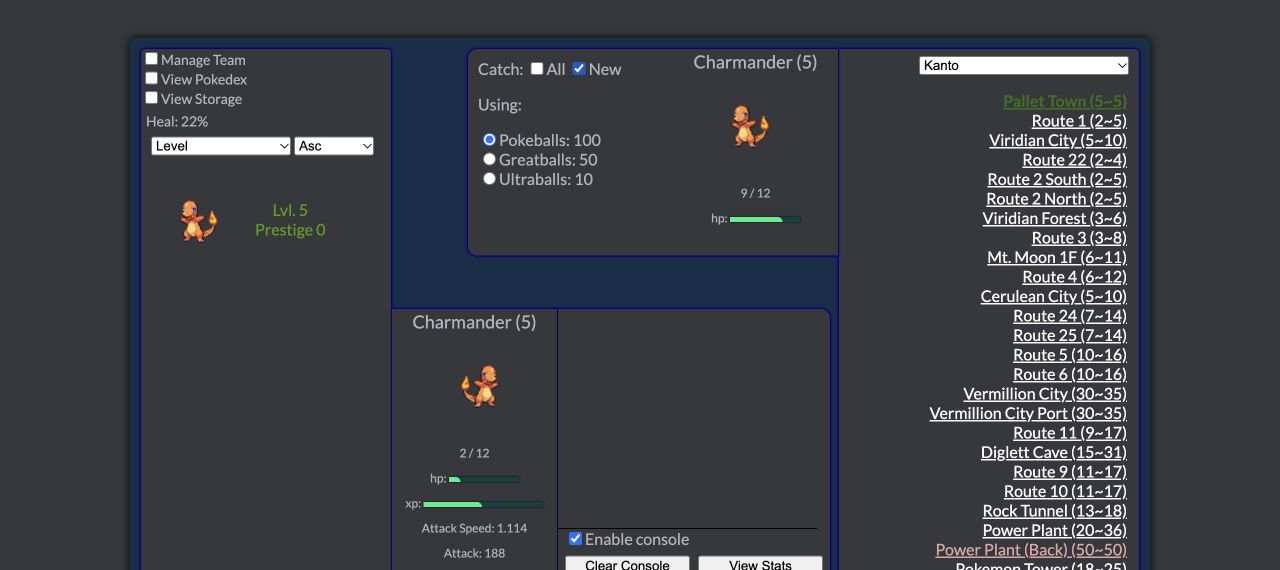
Built-in feature · no extension The live Together Forever – Prestige Edition interface exposes Catch: All / New and a ball selector. We operated New in the browser and checked the corresponding published game logic. The controls set capture policy while the game’s existing combat loop runs.
- Open pokeidle.net and choose a route. Confirm the Together Forever label and check Game Conditions. Use the .net route lookup if you are targeting a species.
- Choose All or New in the Catch panel. All requests an ordinary capture attempt after every defeated enemy. New checks whether you currently own the ordinary form of that species in the team or storage. It is not simply a “never caught before in the Pokédex” filter.
- Select an available ball. The Pokeballs, Greatballs and Ultraballs radio controls choose the ball for ordinary attempts. Read the displayed inventory. An enabled catch policy does not create supplies or guarantee a successful capture.
- Observe a completed fight. With the console enabled, inspect capture or escape messages and the ball inventory. Check your team, storage and View Pokedex rather than assuming every defeat was a catch.
- Use Save before leaving or changing setups. Back up through the game’s own save/export interface before importing anything. We have not certified offline progress or save transfer across hosts.
What about shinies? The checked .net code handles a shiny enemy separately from the All / New ordinary-catch decision and chooses the best available ball for that attempt. A shiny still needs a ball and a successful catch. We do not apply .io’s published shiny odds to this game.
Auto Prestige is a different setting. The Game Settings panel includes it. Prestige changes progression; it does not select hunts or replace the catch controls. Leave it out of your first capture test so you can see which setting caused the change you are observing.
pokeidle.io: begin with the game’s own controls
Built-in hunt loop · account features vary Selecting a hunt already starts automated movement and fighting. That alone does not mean every defeated wild Pokémon is automatically caught. The current terms explicitly discuss VIP Auto-Catch as an automatic throw feature, and distinguish it from capture probability. Check the current in-game status for your account rather than assuming the feature is free or enabled.
Before adding a third-party tool, choose an accessible hunt, inspect the game’s automation panel and selected supplies, and watch a short session. Decide what is actually missing: capture attempts, survival supplies, or moving between hunts. The hunt comparison guide explains the difference between a location estimate and an observed outcome.
The current .io rules, section 5, allow automation provided it follows normal game restrictions. Exploiting flaws, bypassing game limits or overloading the server is excluded. This is .io’s policy, not a blanket authorization for .net, .com, Extended or World. The same terms identify .io as an 18+ service.
pokeidle.io: Zennex Auto Hunt setup
Third-party extension · publisher-documented steps Auto Hunt for PokeIdle is offered by Zennex, credits Liang’s /hunt model, and is separate from both the game and Liang’s own listing. The store page checked here reports version 1.1.1, updated 20 October 2026. We read its current listing and configuration instructions; we have not installed it, audited its packaged code or run an account through its automatic actions.
The verified listing is the place to inspect the current publisher, host permissions and any browser requirements. The reviewed source associates this tool with pokeidle.io; there is no evidence here for compatibility with pokeidle.net or pokeidle.com. We provide the canonical store link rather than a repackaged download or a console installation command.
- Check the destination and publisher. Compare the store page above with Zennex and extension ID
njdfockaafkfolaocfkocpcieieokndb. Review the current browser prompt and .io rules. Installation is optional; it is not required to use this guide or the game’s basic hunt loop. - Open the game at pokeidle.io. The publisher says an Auto Hunt button appears above the Pokémon in the field. If it does not appear after installation and reload, verify the domain and extension site access before attempting anything else.
- Inspect the ranking before automation. Its “Onde caçar?” panel is described as showing unlocked hunts ranked by XP or gold. Read the survival-risk information as well as the headline estimate.
- Set your buying limits. The publisher’s arrow control opens the gold reserve and item thresholds. For each intended item, set the quantity below which to refill and the target quantity. The target should exceed the trigger; keep a reserve that you do not want spent. These are your budget choices, not recommended profit settings.
- Enable the switch in Automação when ready. The listing says this allows hunt changes subject to the game’s combat and timing restrictions. It says the tool does not switch inside Safari or the Pokémon Center.
- Watch the first actual actions. Check that it chooses the intended hunt, buys only intended supplies and respects the reserve. Disable automation if observed behavior differs. Publisher instructions are reproducible setup guidance, not proof that we tested your current account or extension build.
Do I also need to install /hunt? The Zennex listing credits it as a basis, but does not state a separate-install dependency in the instructions we reviewed. Another product, Pokeidle Bot Manager, explicitly states such a dependency. Do not transfer that requirement to Zennex’s tool merely because the names are similar.
What does Liang’s /hunt do? Its own store listing describes a hunt comparison panel using game stats, with damage-risk and income estimates. That description should not be relabelled as an official game feature or proof that it automatically changes hunts.
pokeidle.com and other versions
The .com creator describes auto-battle and idle catch rules per route. That establishes the intended feature distinction, but we have not verified the current exact configuration labels behind its gameplay interface. Open the game’s own route and catch controls; this guide does not provide an .io extension as a .com solution.
Extended builds display All / New controls, but the host and build differ. World advertises idle and offline progression and has its own rules. Neither fact certifies support for the .io tools above. Use the versions hub to reach their own sources. Detailed tool instructions will only be added when the applicable controls and rules are verified.
Common setup questions
My Pokémon fights automatically. Why am I not catching anything?
Fighting and catching are separate. On .net, inspect All / New, the selected ball and available inventory; New also checks current ownership. On .io, inspect your account’s capture automation and selected supplies. An automatic attempt can still fail.
Why does Auto Hunt not switch to the top-ranked location?
For Zennex’s .io tool, the publisher lists combat/timing restrictions and excludes switching in Safari and the Pokémon Center. Check that its Automação switch is on and that you are at the supported domain. We have not verified additional version-specific failure cases.
Can I close the tab and keep hunting?
The .io site says ordinary hunting requires the tab to remain open. Its unattended loop is not an offline-accrual promise. World advertises offline progress, but we have not timed it. We have not verified closed-tab hunting for .net or .com.
Is there a universal PokeIdle auto hunt script?
No universal script is established by the reviewed evidence. Different domains have different clients, data and rules. Use a version’s built-in controls or inspect a tool whose source explicitly names that domain.
Can I use the extension on my phone?
Game mobile support does not establish mobile extension support. The reviewed Chrome listings target browser extensions; check your particular browser’s extension support. We have not performed a mobile extension installation test.
Sources & verification
Last checked . Each source applies only to the version named beside it.
- PokeIdle.net — live game ↗Interface and version label checked directly.
- PokeIdle.net — current game logic ↗Built-in catch settings, prestige and save behavior.
- PokeIdle.io — game introduction ↗Built-in hunt loop, browser/mobile support and Hunt Analyser. Marketing totals are not independently measured.
- PokeIdle.io — current Terms, sections 5 and 14 ↗Automation rules; document version 12 Oct 2026, displayed revision 16 Nov 2026. Read in the browser.
- Auto Hunt for PokeIdle — Chrome Web Store ↗Zennex; listing v1.1.1, updated 20 Oct 2026. Setup documented by publisher; not installed or playtested by us.
- /hunt for PokeIdle — Chrome Web Store ↗Liang; listing v1.0.19, updated 10 Nov 2026; explicitly targets pokeidle.io. Publisher claims, not our benchmark.
- pokeidle.com — creator introduction ↗Creator -atsuki describes routes, auto-battle and catch rules; May 2026, not a current patch log.
- PokeIdle Extended — Renlok browser build ↗Live build identifies itself as 0.1.5.
- Poke Idle World — own landing page ↗Separate endpoint and project name; advertises browser/mobile and offline progress. Not independently timed.
Verification limits: .net New was operated in the browser and its code inspected. .io extension steps were checked against the publisher’s listing only; installation, permissions auditing, paid account features, restocking behavior and end-to-end automation were not tested. No third-party extension screenshot is presented as our own tested setup.